


Can Your PC Handle Games?
Date
2026-08-05
Views
305

👁️🗨️ You want to play games with your PC but not certain if it can run games? Try this by just using PowerShell Command. Follow the steps below!
🔋 Accessing PowerShell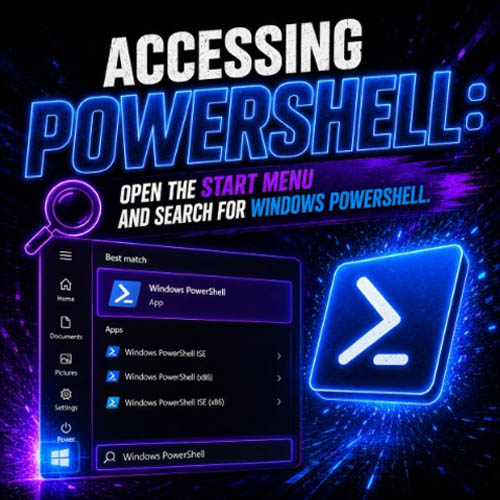
● Open the Start Menu and search for Windows PowerShell
💬 Executing the Command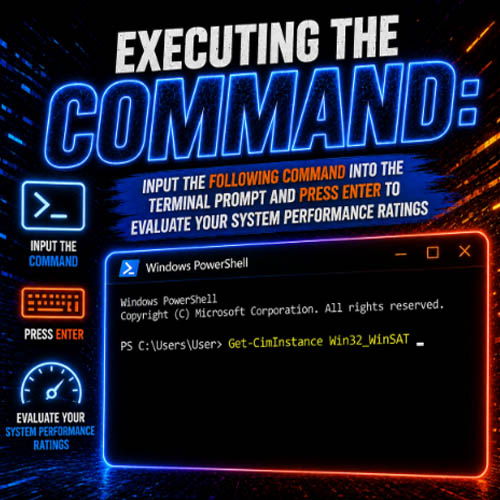
● Input the following command into the terminal prompt "Get-CimInstance Win32_WinSAT" and Press Enter to evaluate your system performance ratings.
📺 Interpreting Key Metrics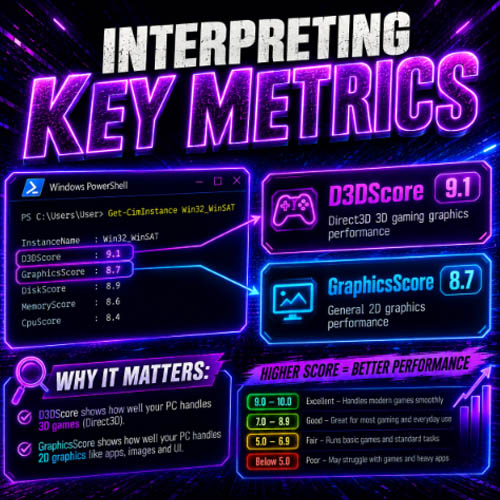
● Review the generated output, focusing primarily on two scores
1.D3DScore (Direct3D 3D gaming graphics performance)
2. GraphicsScore (General 2D graphics performance)
❗ Important Disclaimer: Real-world gaming performance depends on multiple hardware components—such as your dedicated Graphics Card (GPU), Processor (CPU), and System RAM—as well as the specific minimum/recommended requirements of individual games.
Try this out and find out if your PC can run games!
--------------------------------------------------------------------------------------------------
🎥 For the complete video presentation, please click the link below:
👉 https://www.youtube.com/watch?v=qTRYss2S7P0
🎓 For tips, guides, and tutorial content, please visit our official YouTube channel:
👉 https://www.youtube.com/@OPENPINOYiWatchYou
📞 Contact Information
For inquiries and further assistance, please reach us through the following channels:
📱 Mobile / Viber: 0917-822-1232 / 0917-822-3232
📧 Email: openpinoy_onlinesales@hotmail.com
🌐 Website:
👉 Website for B2B - WWW.OPENPINOY.NET
👉 Website for Retail - WWW.OPENPINOY.COM